> ## Documentation Index
> Fetch the complete documentation index at: https://docs.sailhouse.dev/llms.txt
> Use this file to discover all available pages before exploring further.
# Quickstart
> Start sending events in minutes
## Sending an event
First things first, [get signed in](https://app.sailhouse.dev) and create your team.
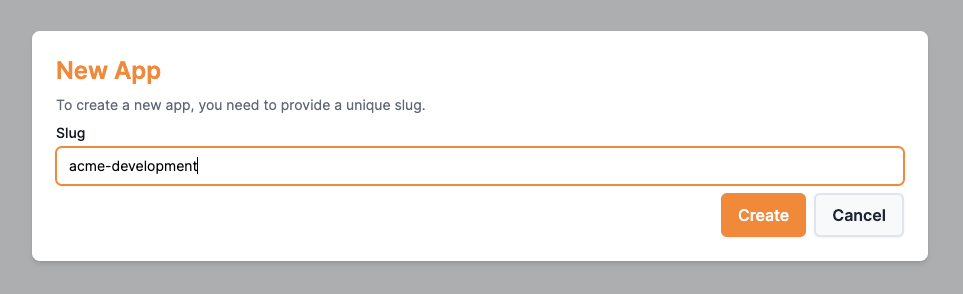
In Sailhouse, [apps](/concepts/apps.mdx) are the logical separators for your topics. This could be environments, projects or both!
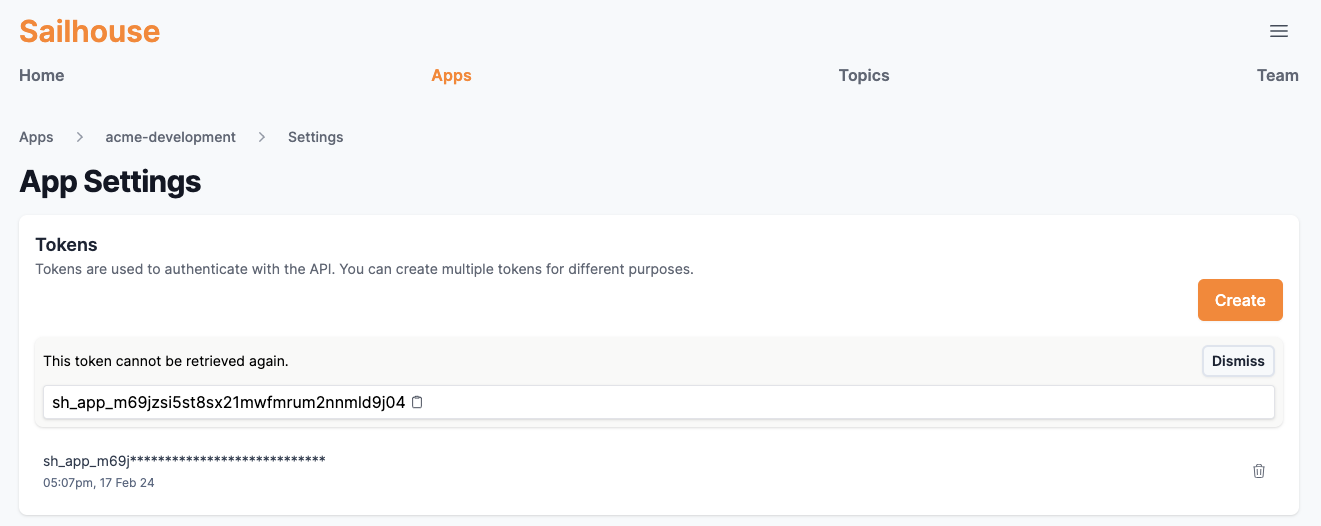
 To send an event to an application, we need a token to pass into our SDK.
Go to your [new app](https://app.sailhouse.dev/apps) > **Settings** > **Create**
To send an event to an application, we need a token to pass into our SDK.
Go to your [new app](https://app.sailhouse.dev/apps) > **Settings** > **Create**
 First, adding the SDK package
```bash Adding the package theme={null}
go get -u github.com/sailhouse/sdk-go/sailhouse
```
Then, a basic example which reads the token from an environment variable `SAILHOUSE_TOKEN`.
```go main.go theme={null}
package main
import (
"github.com/sailhouse/go-sdk/sailhouse"
)
func main() {
client := sailhouse.NewSailhouseClient(os.Getenv("SAILHOUSE_TOKEN"))
client.Publish("awesome-example", map[string]string{
"message": "Hello World!",
})
}
```
First, installing the SDK.
```bash Intsalling the package theme={null}
npm install @sailhouse/client
```
Then a basic example ,taking advantage of top-level await.
```ts index.ts theme={null}
import { SailhouseClient } from "@sailhouse/client";
const client = new SailhouseClient(process.env.SAILHOUSE_TOKEN);
await client.publish("signups", {
email: "hello@sailhouse.dev",
type: "pro",
});
```
## Next steps
Do everything you need from your terminal with the Sailhouse CLI
You've sent an event, now see how you can handle them.
First, adding the SDK package
```bash Adding the package theme={null}
go get -u github.com/sailhouse/sdk-go/sailhouse
```
Then, a basic example which reads the token from an environment variable `SAILHOUSE_TOKEN`.
```go main.go theme={null}
package main
import (
"github.com/sailhouse/go-sdk/sailhouse"
)
func main() {
client := sailhouse.NewSailhouseClient(os.Getenv("SAILHOUSE_TOKEN"))
client.Publish("awesome-example", map[string]string{
"message": "Hello World!",
})
}
```
First, installing the SDK.
```bash Intsalling the package theme={null}
npm install @sailhouse/client
```
Then a basic example ,taking advantage of top-level await.
```ts index.ts theme={null}
import { SailhouseClient } from "@sailhouse/client";
const client = new SailhouseClient(process.env.SAILHOUSE_TOKEN);
await client.publish("signups", {
email: "hello@sailhouse.dev",
type: "pro",
});
```
## Next steps
Do everything you need from your terminal with the Sailhouse CLI
You've sent an event, now see how you can handle them.